Secuiera - Physical Security Audit & Compliance Platform
See Every Risk.
Close Every Gap.
Prove Every Action.
Start with 100+ pre-built security controls or create your own templates. Every finding, attachment, and audit record is protected with enterprise-grade encryption using keys that remain under your organisation’s exclusive control.
- 100+ controls, and added customization
- Security & Isolation
Evidence protection
Evidence encrypted under a key only your organisation holds.
Audit evidence is a map of where a site is weak, so it is protected accordingly. Every control below is implemented in the platform today.
Per-tenant encryption keys
Your organisation gets its own data key. No other tenant's evidence sits under it.
AES-256-GCM at rest
Authenticated encryption, so tampering is detected rather than silently accepted.
AWS KMS key wrapping
Your data key never sits in plaintext. Only the application role can unwrap it.
CloudTrail key audit log
Every unwrap is recorded, so key use stays auditable after the fact.
Role-based access control
Five roles, from view-only through to organisation administrator.
Tenant-isolated data
Every query is scoped to your organisation. Cross-tenant reads are not expressible.
Six modules, one audit trail.
A failed question becomes a finding, a finding becomes a tracked corrective action, and approving the audit generates the report. You don't re-enter anything along the way.
What does your audit programme cost today?
Built only from hours you already know: how long one audit takes you now, stage by stage. Secuiera does not make the site visit shorter. What it changes is the work either side of it, and you decide which of that you believe.
Your audit programme
Hours in one audit todayEvery ticked line is something the platform does as part of the audit rather than after it. Untick any you don't accept and the figures move. The site visit is never ticked: walking a perimeter takes as long as it takes.
16hWe do not shorten this, and do not claim to.
Built once as a template, then versioned and reused
Attached to the question it answers, as it is answered
Generated on approval, with the section breakdown
Raised from the question that failed, with an owner
Starting numbers, not ours to assert. Change every one to match how your team actually works.
What that works out to
AUD 48,000
What the programme costs you today
640 audit hours at AUD 75 per hour
With those 4 lines done for you
320
Audit hours left per year
AUD 24,000
What those hours cost
320
Hours freed per year
8.0
Full-time weeks back
AUD 24,000
Cost freed per year
Arithmetic on the inputs beside this: 10 sites x 4 audits x 16h = 640 hours, at AUD 75 per hour. Figures in AUD. Not a projection or a guarantee.
One audit, start to signed off.
No parallel spreadsheet, no chasing photos over email, no rebuilding the report from scratch at the end.
- 1
Schedule
Book a site, a template and a date on the audit calendar.
- 2
Assign
Send it to a site auditor. Delegate when they're unavailable.
- 3
Conduct
Work the questionnaire on site. Attach evidence as you answer.
- 4
Review
A manager checks every response and every critical fail.
- 5
Approve
Approve or reject. Approval generates the report automatically.
100+
Controls ready to use
Across 16 sections of the physical security question bank
7
Lifecycle statuses
Draft through to approved or rejected
3
Roles
View-only through to organisation administrator
50 MB
Per evidence file
Photos, video and documents
Built for resilience in physical security.
Perimeters, access control, surveillance and the people who work a site. The question bank, the scoring and the evidence rules were all written for that world.
Physical security is the whole subject
Perimeter, access control, surveillance, personnel screening, emergency procedures. The question bank was written for facilities, and every control carries its criticality and evidence requirement.
Audit against your own standard
Start from either ready control set, or build one from scratch. Set section and question weighting, version it as it changes, and lock the version you audit against.
Evidence encrypted under your own key
Each organisation gets its own data encryption key, used for AES-256-GCM and wrapped by AWS KMS. Every unwrap is recorded in CloudTrail, so key use is auditable after the fact.
Multi-site from the first audit
Sites carry their own audit history, findings queue and risk context. Leadership sees the whole estate on one map and one trend line instead of a folder of spreadsheets.
Still running audits in spreadsheets?
Most teams start there. Here is what changes when the audit, the evidence and the follow-up live in one system.
| Capability | Secuiera | Spreadsheets & shared drive |
|---|---|---|
| Physical security control set included | 100+ controls, 16 sections | Not supported |
| Scoring calculated as you answer | Section & question weighted | Manual formulas |
| Critical fails tracked apart from score | Supported | Not supported |
| Evidence attached to the specific control | Supported | Filenames and folders |
| Evidence encrypted with a per-tenant key | AES-256-GCM, AWS KMS | Not supported |
| Review and approval chain | 7 statuses | Email threads |
| Findings become tracked corrective actions | Owners, due dates, chat | Manual |
| Report generated from the audit itself | On approval | Rebuilt by hand |
| Site risk scoring from audit history and area data | Supported | Not supported |
| Cross-site and cross-organisation benchmarking | Supported | Not supported |
Audit against our standard, or build your own.
GFSA and GTSA ship ready to run. Build anything else in the template builder, where every control tells you which external standard it maps to.
GFSA
Global Facility Security Assessment
Facility-side physical security: Perimeter, access control, CCTV and monitoring. Ships as a ready template at Level 1.
Structured around TAPA FSR
GTSA
Global Transport Security Assessment
In-transit security: Vehicle security and driver requirements. Ships as a ready template at Level 1.
Structured around TAPA TSR
Your own standard
Custom templates
Build any control set section by section with your own weighting, criticality and evidence rules, then version it and lock the version you audit against.
Know Gaps in Standards before Certification
Every control in the question bank names the external standard it answers to. Pull those controls into a template, set the weighting, and you have an assessment shaped to the standard, running across your estate on the same schedule as everything else.
TAPA Transported Asset Protection Association
Perform a gap analysis against TAPA-tiered security standards. Compare your current controls to the required standards, identify gaps and weaknesses, assess risk and impact, and prioritise actions to achieve compliance.
Customs-Trade Partnership Against Terrorism
Every control in the question bank carries its C-TPAT MSC reference. Pull those controls into a template, weight them, and initiate a gap analysis against a C-TPAT shaped assessment.
Authorised Economic Operator
Controls carry their AEO safety and security reference, so you can assemble the assessment your customs authority expects and re-run it each time your accreditation comes up for review.
Physical security, wherever your sites are.
Two control sets, written for facilities and for what moves between them. Neither is tied to a sector - the same questions apply to a distribution centre, a plant, a depot or a data hall.
Any site you operate, hold stock in, or contract someone else to run
The building, everyone inside it, and everything held there.
One weighted control set covering the perimeter inward - who gets in, what watches them, who vetted the staff, and what happens when something goes missing. It is written for facilities rather than adapted from an IT questionnaire, which is why insider risk and cargo loss sit alongside alarms and lighting.
16 sections·112 controls
See the full question bankSections in this control set
Ref
- HRInsider Risk Management
- SASecurity Awareness & Training
- TSTraveller Security
- ISCyber & Information Security Controls
- PSAPhysical Security Controls – Alarms
- PSCPhysical Security Controls – Access Control System
- CSCCTV & Surveillance Controls
- PSLPhysical Security Controls – Lighting
- FPSFacility Perimeter & Physical Access Security
- HVAHigh Value Asset Protection & Access Control
- FSSFreight Security – Seal Governance
- VMAVehicle and Mobile Asset Security
- GRDSecurity Personnel & Guarding Management
- VCMVisitor & Contractor Management
- IRMIncident Reporting & Investigation Management
- CLPCargo & Inventory Loss Prevention
What the platform does
An audit programme, end to end.
One place for the schedule, the questionnaire, the evidence, the findings and the report. Everything below runs in the product today.
Running the audit
- Scheduling, assignment and delegation across every site
- On-site questionnaire, scored as you answer
- Critical fails held apart from the overall score
- Manager review queue, with approve and reject
Your control set
- 100+ physical security controls across 16 sections
- Ready control sets for facilities and for transport
- Template builder with weighting and criticality
- Version, clone and lock what you audit against
Evidence and findings
- Photos, video and documents tied to the control they answer
- AES-256-GCM under a key only your organisation holds
- Findings raised from the question that failed
- Corrective actions with owners, due dates and overdue tracking
Seeing the estate
- Audit report generated on approval, plus CSV export
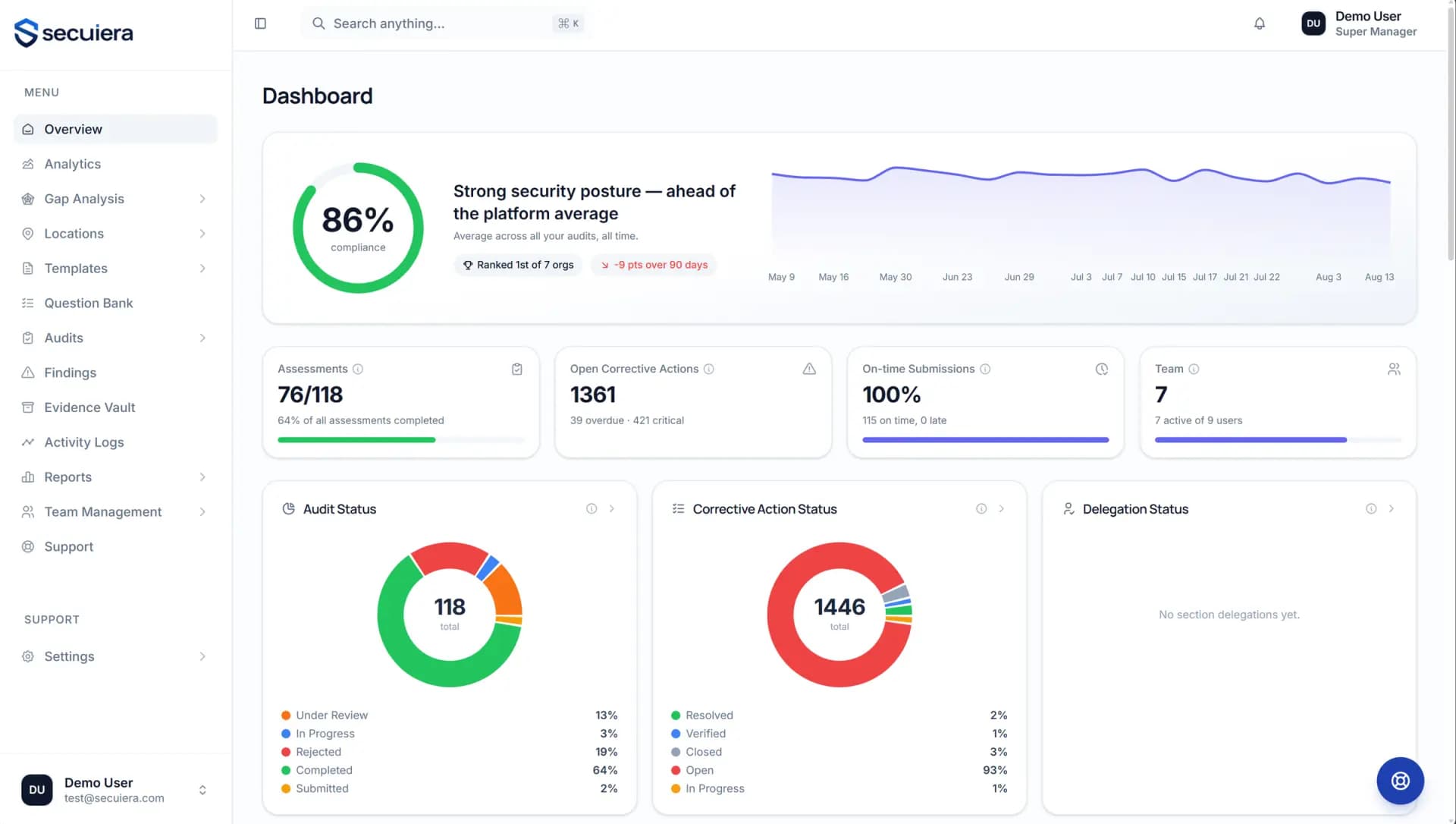
- Compliance trend, status breakdown, per-site comparison
- Site risk scores from audit history and area crime data
- Suggested corrective actions drawn from similar past findings
The questions security teams actually ask.
If what you need isn't here, ask us directly. A real answer is faster than working it out from a marketing page.
Ask us somethingSchedule an audit against a site, assign or delegate it, conduct it on site with evidence attached per control, send it for review, and approve it. Approval generates the report. Failed questions become findings, findings become corrective actions with owners and due dates, and the analytics show your trend across sites. There are 100+ controls across 16 sections ready to use, and from Professional up, a builder for your own.
Two ready control sets: one for facilities and one for transport, both structured around the TAPA standards. Every control in the question bank also names its C-TPAT and AEO references, so an assessment shaped to either is a matter of pulling those controls into a template and setting the weighting.
Yes, from Professional up, and for most teams that's the point. Build a template section by section from the question bank or from scratch, set section and question weighting, mark controls critical, require evidence on specific questions, then version it. Lock a version so the thing you audit against doesn't shift underneath you. Basic runs the ready control sets as they ship.
Each organisation gets its own data encryption key, used for AES-256-GCM encryption. That key is wrapped by a master key in AWS KMS, so it never sits in plaintext, and only the application's IAM role can unwrap it. Every unwrap is recorded in AWS CloudTrail. Data access is scoped to your organisation on every query, and access within your organisation is governed by 3 roles.
It scores each location on a 0-100 scale by combining your audit history with crime data for the area around the site, so sites compare against each other rather than against a raw compliance percentage. Alongside it, corrective-action suggestions surface how similar findings were resolved before.
Add every location you operate; no plan caps how many. Each carries its own audit history, findings queue and risk score. From Basic up, the analytics roll them into a calendar, a map, per-site analytics, a compliance trend and score distribution, and comparison against the platform average.
Pricing is per site, and sites are the only thing counted: members and audits are never metered, and no plan caps how many sites you can add. The plan pages set out exactly which capability sits in each tier. Ask for a quote and you will have a number on the call, quoted against your actual estate.
Using a ready control set as it ships, it is a short exercise: add your sites, invite your team, schedule the first audit. Building a custom standard depends on how settled your control set already is. Bring it to the demo and we will size it properly.
Support runs from inside the platform, where it can see your organisation and your audits. Every request gets a response within 24 hours, from the people who build the product rather than a first-line queue reading from a script.
Yes. Audit reports export as PDF and every data view exports as CSV, on every plan.
Show us your audit programme.
We'll show you ours.
Thirty minutes, walked through the platform with your sites and your standard in mind. Bring the control set you audit against and we will run it through the builder on the call.