
Start from real controls, then make them yours.
Start from 100+ ready controls, then shape them into your own standard.
- 100+
- Controls ready to use
- 16
- Sections of physical security
- Version & lock
- So audits stay comparable
100+
Controls
Physical security assessment, ready to use
16
Sections
From insider risk to emergency procedures
2
Templates ship ready
GFSA and GTSA, Level 1
3
Criticality levels
Critical, high and standard controls
What the control set asks about.
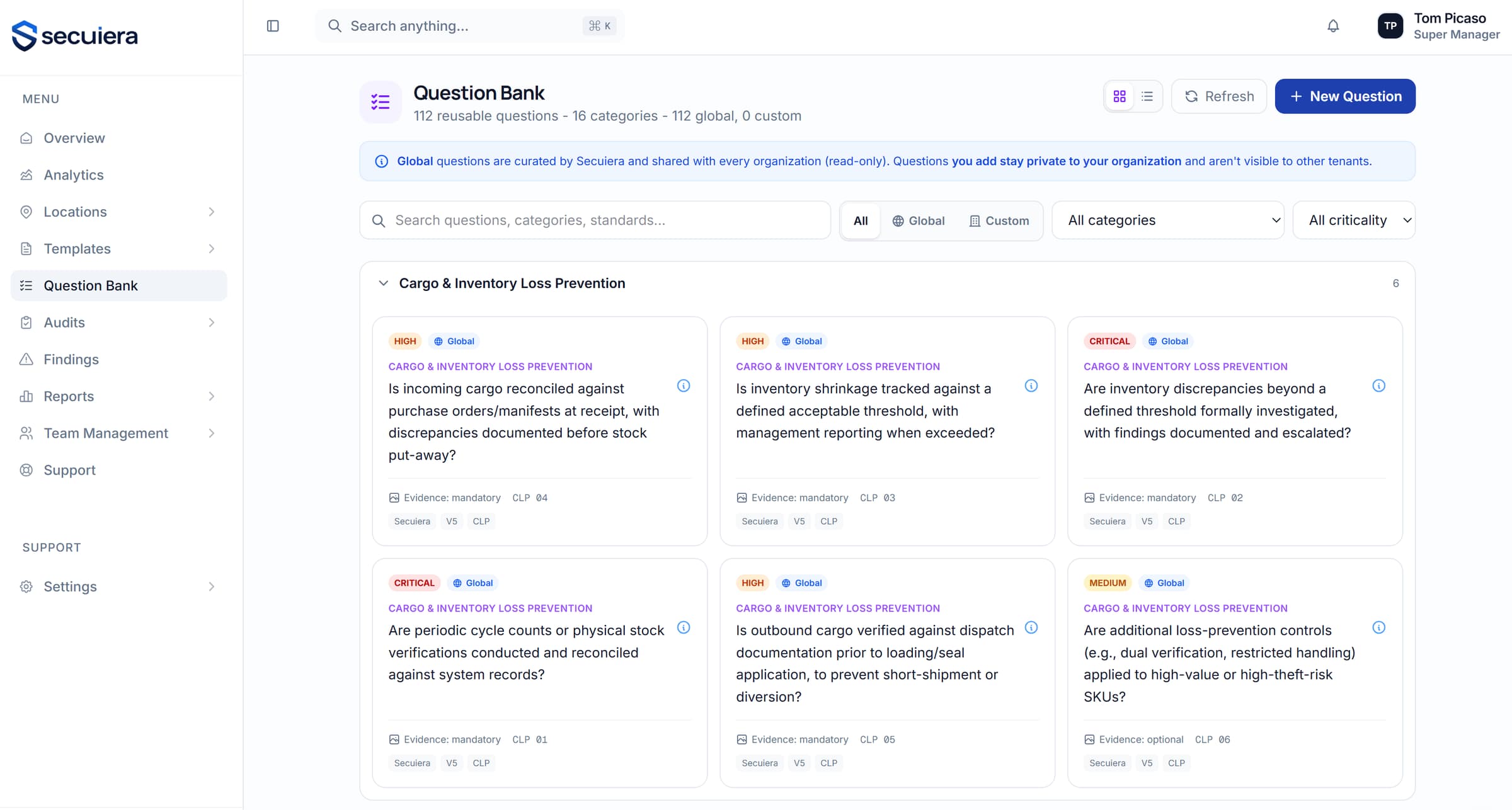
A sample of the sections. These are facility questions, the kind an auditor walks a site to answer rather than a form about policy documents.
Every control carries its context
A question isn't just text. It comes with its category, its control id, whether it's critical, whether evidence is mandatory, and which external standard it corresponds to.
- 1Category and control id on every entry
- 2Criticality and mandatory-evidence flags
- 3Which evidence types are acceptable for that control
- 4The documentation an auditor should expect to see
Build the standard you audit against.
Most security teams already have a control set, in a spreadsheet or a document or someone's head. This is where it becomes something you can run.
- 1
Start
From a ready control set, from the question bank, or from an empty template.
- 2
Shape
Add sections and questions. Set criticality and evidence requirements.
- 3
Weight
Assign section and question weights. The platform validates they sum to 100.
- 4
Version
Publish a version. Clone it later when the standard changes.
- 5
Lock
Lock the version you audit against, so it can't shift mid-cycle.
References, not mapping
Each control cites the external standard it corresponds to: C-TPAT MSC, TAPA FSR, ISO. That's a citation you can read, and it's how you assemble a framework-shaped assessment. It is not an engine that answers one control and fills in others for you.
Weighting that's validated
Section and question weights must sum to 100. The platform enforces it, so you can't publish a template that quietly produces a score nobody can interpret.
Versioning and cloning
Standards change. Clone the current template, revise it and publish a new version, keeping the old one intact so historical audits still make sense against what they were scored on.
Locking
Lock a template so it can't be edited. An audit cycle running against a moving control set produces results you can't compare year on year.
The full list.
- 100+ controls across 16 sections, ready to use
- Every control cites its C-TPAT, TAPA FSR and AEO reference
- Criticality and mandatory-evidence rules per control
- Build custom templates section by section, with weighting
- Version and clone templates; lock the ones that shouldn't change
- Import an existing question set rather than retyping it
See it against your own sites
Thirty minutes with the people who build it, walked through the modules that matter to your programme rather than a scripted tour.