
Run the audit, not the paperwork.
Run every audit from scheduling to sign-off, with scores calculated as you answer.
- 7
- Statuses from draft to approved
- 100
- Weights validated to sum exactly
- Delegation
- When an auditor is unavailable
From a date in the calendar to a signed-off report.
Each handover is explicit. An audit is always somewhere specific, owned by someone specific.
- 1
Schedule
Book a site, a template and a date on the audit calendar.
- 2
Assign
Send it to a site auditor. Delegate when they're unavailable.
- 3
Conduct
Work the questionnaire on site. Attach evidence as you answer.
- 4
Review
A manager checks every response and every critical fail.
- 5
Approve
Approve or reject. Approval generates the report automatically.
The seven statuses an audit can be in
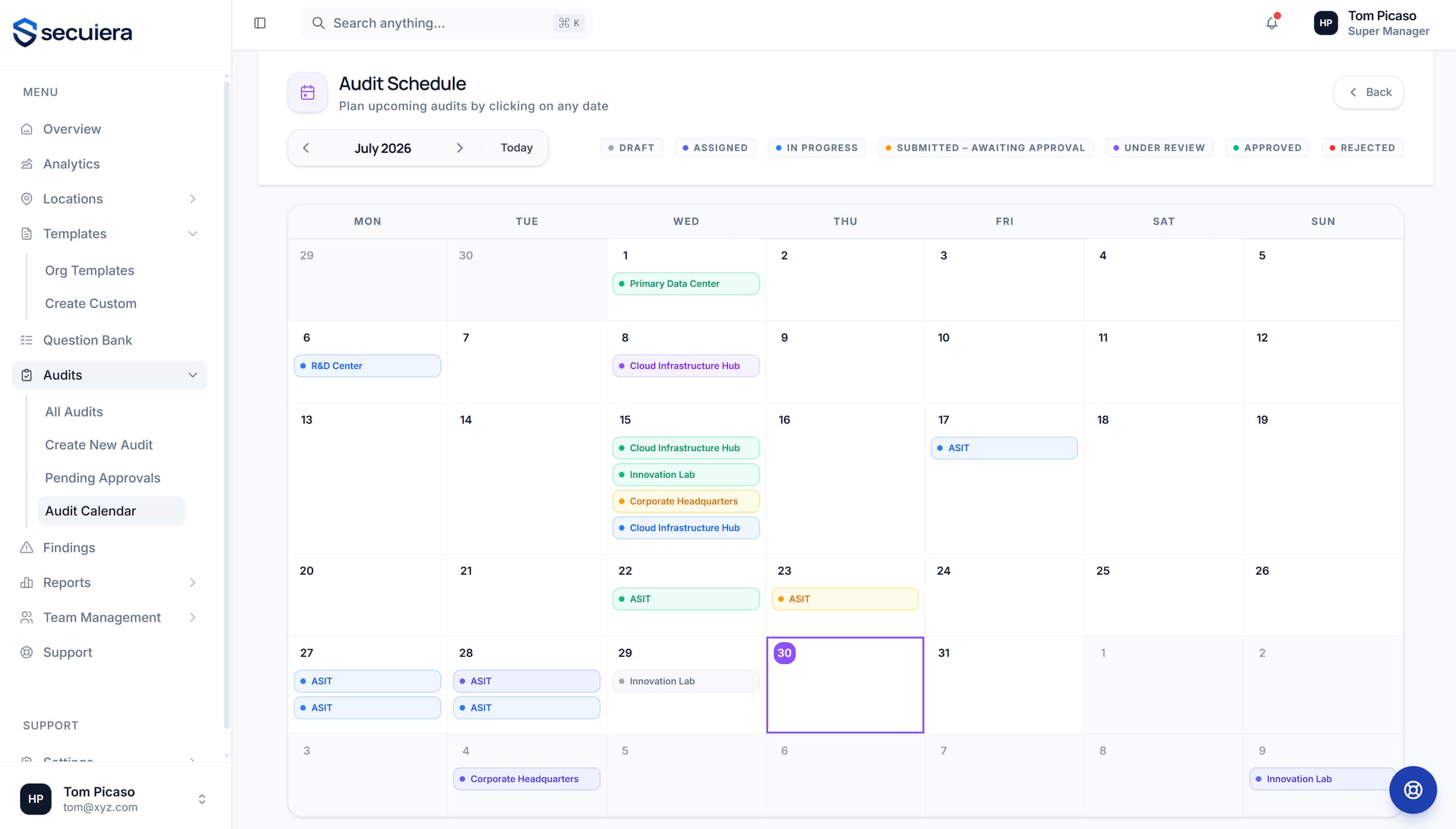
The calendar is the programme
The month view shows what is happening where, and what is overdue for someone's attention.
- 1Every scheduled audit across every site, one month view
- 2Status colour tells you whether it's moving or stuck
- 3Schedule straight from a date against a site and template
- 4Pending approvals surface in their own queue for reviewers
A score you can defend.
Weighting is explicit and validated, so nobody has to reverse-engineer how a site got the number it got.
Section and question weighting
Set the weight of each section and each question inside it. The platform validates that weights sum to 100, so a template can't silently produce a meaningless score.
Critical fails tracked separately
A control marked critical is reported on its own, not averaged away. A site can score well overall and still have a critical failure you need to see.
Assignment and delegation
Assign an audit to a site auditor. If they are unavailable, delegate it, and the handover is recorded rather than happening over a phone call.
Review before it counts
Submitted audits go to a manager, who approves or rejects. Approval is what generates the report, so an unreviewed audit never becomes a record.
The full list.
- Audit calendar with every scheduled assessment across all your sites
- Assign to a site auditor, or delegate when they're unavailable
- 7 lifecycle statuses from draft through to approved or rejected
- Section- and question-level weighting, validated to sum to 100
- Critical-fail flagging separate from the overall score
- Manager review queue with approve and reject
See it against your own sites
Thirty minutes with the people who build it, walked through the modules that matter to your programme rather than a scripted tour.